|
Warewolf Posts: 15
6/27/2021
|
If I have multiple copies of a single issue and I want to remove one or more (say I own three copies and sell two of them), is there a way to edit the quantity under the MY ISSUES tab? First, I don't see any information in that tab on the quantity of each issue I own. That information can easily be seen on the PRICE GUIDE tab, but I do not see it here. Clicking the EDIT button does not bring this up and so does not provide a way to change it. I have found the brute force method of removing that issue from my collection entirely and then going back and adding back in the current number of issues I own after having sold some. There should be an easier way to do this. If there is, I hope someone can explain it to me. If not, I hope an admin can get it added.
|
|
|
0
link
|
|
BasementComics Posts: 784
6/27/2021
|
If you click on the issue in question and go to my collection, it will show all the books in your collection and from there, you can delete a copy by clicking on the red x.
|
|
|
0
link
|
|
Theoldcollector Posts: 213
6/28/2021
|

|
|
|
0
link
|
|
Warewolf Posts: 15
7/3/2021
|
Let's see if I'm understanding correctly. I look up the 1991 X-Men series and from the Price Guide page, I click on issue #1 (where it shows that I own three issues). Then from there, I click on the link that says My Collection. Here again it shows that I own three issues. If I click the red X next to this listing, however, it's going to delete all three copies. What I want to do is delete two copies so that it shows that I only own one copy.
In addition to the red X next to this listing, there is also an edit button. Unfortunately, clicking that button does not allow me to edit the number of copies I own.
|
|
|
0
link
|
|
rgtichy Posts: 124
7/3/2021
|
No, if you own 3 copies of something then "my collection" will show 3 lines for 3 issues. Each issue could have separate grades and details (notes, like "autographed") There's a red "X" next to each line...
edited by rgtichy on 7/3/2021
|
|
|
0
link
|
|
Warewolf Posts: 15
7/4/2021
|
rgtichy wrote:
No, if you own 3 copies of something then "my collection" will show 3 lines for 3 issues. Each issue could have separate grades and details (notes, like "autographed") There's a red "X" next to each line...
edited by rgtichy on 7/3/2021
Unfortunately, I am not seeing that.
|
|
|
0
link
|
|
Theoldcollector Posts: 213
7/4/2021
|
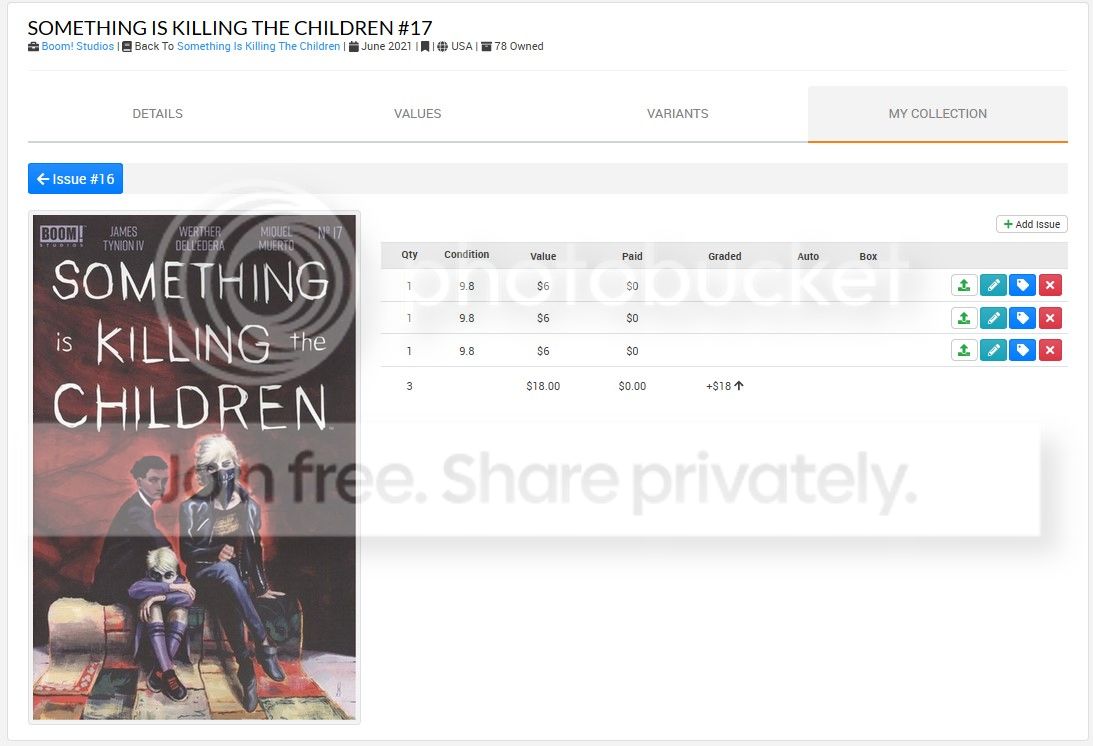
When you go to the book that you have multiple copies of you should be able to click the "My Collection" Tab. In there it should show all of them. Like this is Something is killing the children #17 Cover A. When I click cover A and then click my collection it looks like this. Where I have 3 copies of Cover A.
|
|
|
0
link
|
|
Warewolf Posts: 15
7/4/2021
|
When I click on X-Men #1 and then click on My Collection, this is what I see (one line item showing Qty: 3):

edited by warewolf on 7/4/2021
edited by warewolf on 7/4/2021
|
|
|
0
link
|
|
BasementComics Posts: 784
7/4/2021
|
It's weird you don't have that on your profile. Maybe it may be easier to delete it and then add it back in.
|
|
|
0
link
|
|
Theoldcollector Posts: 213
7/4/2021
|
Yep that is weird. That would be a question for the admin. Is that on all books that you have more then one of or just that one?
|
|
|
0
link
|
|
Theoldcollector Posts: 213
7/4/2021
|
I even tried adding books in bulk all at once and mine still split up the qty in separate lines. So I have no idea what could cause that.
|
|
|
0
link
|
|
Warewolf Posts: 15
7/5/2021
|
Theoldcollector wrote:
Yep that is weird. That would be a question for the admin. Is that on all books that you have more then one of or just that one?
It appears to be on all books that I own more than one copy of. These were added years ago. Not sure if that makes a difference...if something has changed in the system since I added them? I was hoping not to have to go and delete each one I own multiple copies of that I need to change, but it appears that that will be what I have to do.
|
|
|
0
link
|
|
rgtichy Posts: 124
7/5/2021
|
These were added years ago. Not sure if that makes a difference...if something has changed in the system since I added them?
Yeah, that could be a pertinent clue. Someone like RonBatman will probably need to address whether quantities were once handled that way.
|
|
|
0
link
|
|
Ronbatman Administrator Posts: 2530
7/6/2021
|
Yes, that is how the system was a long, long time ago. I checked your account Warewolf and you've been around since 2003. That's a very, very long time in database time. (like dog years only different)
Ron
|
|
|
0
link
|
|
Socalsharky Posts: 1
9/15/2024
|
If the system handles multiple quantities of an issue like this, why is there even a quantity column? It sounds like it will always be “1”.
|
|
|
0
link
|

